 截图 1 / 5
Remnith is a chaotic arcade style VR shooter where enemy units feed off of the energy of every shot that isn’t lodged directly into them. The more you miss the stronger they get.

You’re plunged into a hostile metallic world and the only way to escape is to fight your way back up. Battles take place in over 25 arenas spread across 3 levels with various optional arenas if you’re not in a rush to get out. Don’t expect enemies to be pushovers, every battle is a boss battle.

There’s three enemy types that you’ll encounter that’ll evolve and use different tactics as you make it through the game. The first enemy you find may feel like a tin can but by the end of the game you’ll have the death screen burned into your eyes. Remnith has five difficulty levels. If you don’t like dying or want to run through the game quickly then try out the Tin Can difficulty. If you really want a challenge then Doomsday Device is for you.

Everytime the environment is shot an Energy Scab is created that feeds energy into all enemies in the area. This strengthens them in various ways and speeds up the evolution process. The weakest enemy can turn into something you’d encounter by the end of the game given enough energy.

A single barrel cannon is easy to use but a triple barrel cannon requires you to line up all three crosshairs to utilize its full power. It’s up to you to decide which weapon will best tear your enemies apart without risking missing.

Motion controllers, gamepads and mouse & keyboard setups are all supported. When using motion controllers you have a choice of a few locomotion options such as thumbstick/trackpad movement and teleportation. You can play either sitting or standing, the game isn’t room-scaled but you do need a 360 setup if you’re going to play standing without thumbstick/trackpad turning. There’s also a flat mode if you want to play without a VR headset.
If you’re used to quick movements in VR then you’ll be able dash around your enemies and jump off of ramps. If you prefer an experience that’s easier on your stomach then you can use long range teleportation and snipe your enemies across the map. Teleportation works no matter where your destination point is allowing you to focus on your target rather than finding a valid place to teleport. If you need to teleport out of the way quickly just point in the general direction you want to go without looking. If a wall was selected you’ll teleport to the nearest point on the floor.
Your cannons are controlled based off of where your pointing when using motion controllers, when using a gamepad or mouse you aim where you look. Gameplay footage above thanks to MattyNet and The VR Viking on Youtube.
To play Vive mode run the game using SteamVR as you normally would. To play with the Rift, make sure SteamVR is closed and launch the game in Oculus VR Mode. To play in Desktop mode just launch the game normally.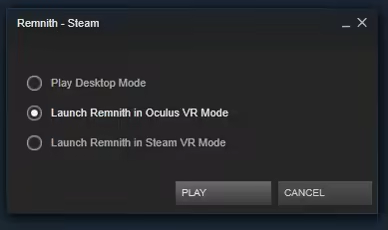
Vive-Shoot with your primary trigger, click your primary trackpad to jump and click the other trackpad to dash. To move you can use trackpads to move normally or use the secondary controller to point in the direction you want to go and push the trackpad outwards to control your speed. With traditional movement you have the choice of moving relative to the rotation of your head or controller. You turn physically by default but you can turn on trackpad turning in the settings.
For players using teleportation you just need to hold the trackpad or trigger on the secondary controller to select a point and release to teleport. Teleportation is instant by default but a fade can be added through the settings.
Oculus Touch-Shoot with your primary trigger, dash with the secondary trigger and jump with A. To move you can use thumbsticks to move normally or use the secondary controller to point in the direction you want to go and push the thumbstick outwards to control your speed. With traditional thumbstick movement you have the choice of moving relative to the rotation of your head or controller. You turn physically by default but you can turn on thumbstick turning in the settings.
For players using teleportation you just need to hold the trigger on the secondary controller to select a point and release to teleport. Teleportation is instant by default but a fade can be added through the settings. To take a screenshot hold down both grip triggers, this will save in Documents/Remnith/Screenshots.
Gamepad-Right trigger to shoot, left bumper to dash and A to jump. Move with the left stick and turn with the right stick. To take a screenshot press the left trigger, this will save in Documents/Remnith/Screenshots.
Keyboard & Mouse-Click to shoot, shift to dash, space to jump and WASD to move.
以上配置信息来自 Steam 商店页面,仅供购买前参考。
基于 Steam 玩家评测:11 篇
暂无折扣记录
本站展示的游戏价格、评分、截图与部分元数据均转载自 Steam 官方商店,版权归 Valve Corporation 及相关发行商所有;本站仅作数据整理与可视化分析,不对数据准确性承担法律责任。

游戏讨论